
MySpot Carrier
Red Technologies, LLCAuto & Vehicles
4.1363.00 Reviews
- Version
- 2.21.0
- Installs
- 100.00K
- Age Rating
- Everyone
Screenshots
Our Review of MySpot Carrier
 Analysis by Appyee
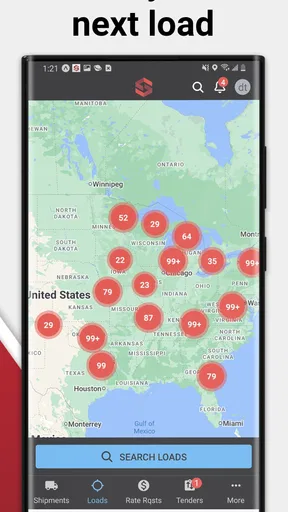
I found MySpot Carrier most useful as a practical work companion for carriers who need to keep load information moving while they are away from a desk. It is not trying to replace every tool involved in freight operations. Its value is narrower and more focused: it brings load-board access, proof-of-delivery submission, load management, and location updates into one mobile workflow.
That focus is also the key to understanding the app. If you are an independent carrier or part of a small fleet, the ability to handle routine updates from a phone can save interruptions during a busy day. If you expect a full transportation-management system with deep accounting, dispatch automation, or extensive reporting, you may find the experience more limited. My overall view is positive, but I would recommend it because of its specific usefulness, not because it attempts to be everything.
What MySpot Carrier does well in everyday carrier work
My first impression is that the app is built around the moments when a driver or carrier needs to act quickly. A load board is most helpful when it reduces the need to switch between unrelated tools, while proof-of-delivery handling matters after the physical work is finished and the paperwork still needs attention. Location updates serve a different purpose, but they fit the same idea: keeping operational information current from the road.
The combination makes sense for a carrier who wants a single mobile point for several recurring tasks. Instead of treating load discovery, shipment administration, document submission, and status communication as separate chores, the app places them within the same carrier-oriented environment. That does not automatically make every task effortless, but it gives the workflow a clear center.
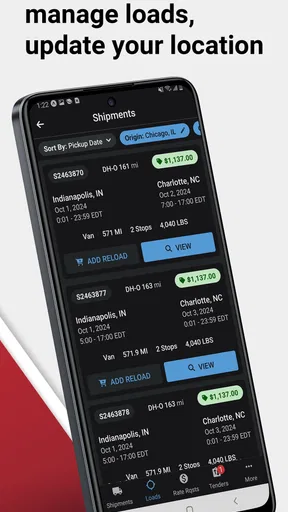
One strength I noticed is the practical relationship between finding a load and managing it afterward. A load board by itself is mainly a discovery tool. Once a load has been accepted, it becomes less important than accurate status handling and completed documentation. MySpot Carrier is more useful than a simple listing viewer because it addresses those later steps too. For a small operation, that continuity can be more valuable than a long list of advanced features that are rarely used.
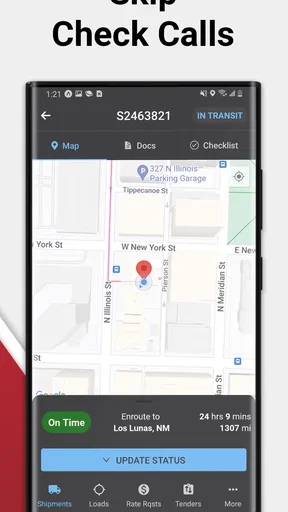
The location function is another feature that deserves a realistic explanation. Updating your location can reduce the need to send separate messages whenever your position changes, especially when a dispatcher or customer needs a current view of progress. I would still treat it as an operational update rather than a substitute for careful communication. A location signal does not explain a delay, confirm a delivery appointment, or replace the need to report an exception clearly.
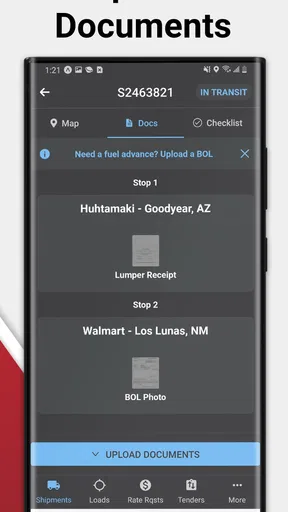
Proof-of-delivery submission is particularly useful at the end of a route. In a paper-heavy workflow, a driver may finish a delivery but still have to photograph, organize, and send documents through another channel. Having submission available inside a carrier app creates a more direct handoff. The practical benefit is not flashy; it is the reduction of small delays that accumulate after every completed load.
A realistic workflow during a busy day
Imagine a carrier finishing a delivery while still managing the next assignment. After unloading, the driver can use the phone to deal with the delivery documentation instead of waiting until returning to the office. The same work session can include checking available loads, reviewing the active load information, and updating the current location. That is the kind of situation where this app earns its place.
The important habit is to handle each step deliberately. I would review the load details before accepting or planning around it, keep the active load information current, and submit the proof of delivery as soon as the paperwork is readable and complete. Doing those tasks immediately is safer than relying on memory at the end of a long shift.
There is also a less obvious advantage for small fleets. When one person is driving and another person is coordinating, a shared mobile workflow can make responsibilities clearer. The driver can concentrate on the physical delivery and timely updates, while the office side can work from the information being submitted. That only works when everyone follows the same process, but the app gives the process a recognizable place to live.
Where the mobile design helps, and where it asks for care
A phone-based carrier tool has an obvious advantage: it is available in the setting where the work happens. You do not need to be sitting at a computer to deal with a load-related action. For drivers who spend most of the day moving between pickup and delivery points, that accessibility is the main reason to choose a mobile app over a browser-only routine.
At the same time, mobile convenience can encourage rushed decisions. A small screen is not the ideal place to compare many options, inspect complicated details, or make a decision while distracted. I would use MySpot Carrier for quick operational actions, but I would avoid browsing or updating anything while the vehicle is moving. Pulling over first is not just sensible; it also makes it easier to check that the correct load or document is being handled.
Another useful practice is to verify information before submitting it. A proof-of-delivery image that is blurry, incomplete, or attached to the wrong load can create more work than the original paper process. The app can make submission faster, but it cannot correct a poor photo or an overlooked signature. My recommendation is to review the document on the screen before sending it and keep the phone steady when capturing it.
The main weakness: it is focused rather than all-encompassing
The biggest limitation is not that MySpot Carrier lacks a particular headline feature. It is that the app’s focused carrier workflow may not cover every administrative need a growing operation has. Load access, load handling, proof-of-delivery submission, and location updates are meaningful tools, but a carrier may also need separate systems for bookkeeping, fuel records, maintenance, invoicing, compliance, route planning, or detailed fleet analytics.
That means the app can simplify one part of the business without eliminating the rest of the software stack. For an independent operator, this may be perfectly acceptable. For a larger fleet with several dispatchers, multiple vehicles, and complex reporting needs, the need to combine it with other tools could become a source of friction.
I would also be cautious about treating the load board as a promise of better business by itself. A board can make opportunities easier to see, but the carrier still has to judge distance, timing, equipment suitability, operating cost, and the reliability of the arrangement. The app can support that decision; it cannot make the decision for you. A convenient interface should not replace basic load profitability checks.
Location updating has a similar trade-off. It can improve visibility, but frequent status maintenance depends on consistent use. If one person updates carefully and another forgets, the information becomes less dependable. In a team, it is worth agreeing on when location updates should be made and who is responsible for them. Without that routine, the feature may exist but provide only an incomplete picture.
How it compares with common alternatives
The usual alternative is a mixture of browser-based load boards, phone calls, messaging apps, email, and camera photos stored separately. That approach can work, especially for a carrier who already has a familiar system and does not want to change it. Its weakness is fragmentation. Important information can be spread across several places, and proof of delivery may be sent through a different channel from the one used to discuss the load.
MySpot Carrier is more appealing when the goal is to consolidate the carrier’s routine mobile actions. It is less compelling if your current arrangement already gives you strong dispatch software, reliable document handling, and clear location communication. In that case, adding another app may create duplicate work rather than remove it.
Compared with a general-purpose notes app or messaging service, a dedicated carrier tool gives the workflow more structure. A message can transmit a photo, but it does not necessarily organize that photo around the rest of the load process. A notes app can store reminders, but it is not designed around carrier activity. The advantage here is context: the tasks belong together because they are part of the same freight operation.
Compared with a full transportation-management platform, the trade-off is simplicity versus breadth. A larger system may offer more layers of administration and oversight, while MySpot Carrier is easier to understand as a direct working tool for carriers. I would choose the latter when speed and mobile access matter more than centralized complexity.
Who will benefit most from using it
I think the best audience is an independent carrier, owner-operator, or small fleet that wants a straightforward way to manage essential load activity from a phone. It is especially suitable for someone who regularly needs to check load opportunities, keep active information updated, submit delivery documents, and communicate a current location without returning to an office computer.
It can also make sense for a carrier who is moving away from a scattered paper-and-message routine. The benefit will be greatest if the operator is willing to establish a consistent process: inspect the load information, update the relevant status, capture readable documents, and complete the handoff promptly. The app is not a magic replacement for organization, but it can support better organization.
I would be more hesitant to recommend it as the only operational platform for a large company. If your work depends on elaborate dispatch rules, deep financial controls, maintenance scheduling, or extensive management reports, you may need a broader system alongside it. MySpot Carrier can still have a place in that environment for carrier-side actions, but it should be evaluated as one component rather than the entire operation.
It is also not the right choice for someone who rarely handles freight-related tasks on a mobile device. If you only manage loads from a desktop and already have an established document process, the app may add little. Its strongest argument is convenience in the field, so users who do not need field access will feel less of its benefit.
Practical tips for getting better results
Before relying on the app during a busy route, I would spend time learning the order of its main tasks. Knowing where to find load information, where to manage an active load, how to submit a proof of delivery, and how to update location is more valuable than discovering each screen during a time-sensitive stop.
For document handling, create a consistent habit rather than waiting until the end of the day. Make sure the entire page is visible, check that the important details are legible, and confirm that the document belongs to the correct load before submitting it. This simple review step is one of the best ways to prevent avoidable administrative backtracking.
For location updates, agree on a routine that matches your operation. A small carrier may update at meaningful stages of the trip, while a dispatcher may expect a different rhythm. The important point is consistency. A location feature is most useful when the people receiving the information understand what an update means and when the next one should be expected.
I would also keep a backup communication habit for exceptions. If there is a delay, a damaged document, a changed appointment, or any situation that needs explanation, do not assume that a location update alone communicates the problem. Use the normal human communication channel required by your operation and treat the app as support for the record, not as a replacement for judgment.
Compatibility, cost, and overall usability
MySpot Carrier is free, which lowers the barrier for a carrier who wants to test a mobile workflow without committing to a paid tool first. It is available for devices running Android seven or later, so compatibility should be reasonable for many older phones as well as newer ones. I would still check the device you plan to use before making it part of a company-wide process.
The app comes from Red Technologies, LLC and has built a noticeable user base, with more than a hundred thousand installs. Its average rating is 4.1 from around four thousand ratings, while the review count is in the hundreds. Those figures suggest that many users find the concept useful, but they also leave room for different experiences depending on workflow, device, and expectations.
The Everyone content rating makes it suitable from an age-classification perspective for a broad audience, although the actual usefulness is clearly aimed at people involved in freight transportation. It was released in October 2020 and is currently at version 2.21.0. That history matters because this is not an experimental idea with no operating track record, but I would still judge it by how well it fits your current carrier process.
One thing I appreciate about the product positioning is that it does not need to pretend to be entertainment or a general productivity suite. It is an Auto & Vehicles app with a specific professional purpose. That specialization is a benefit when your daily needs match it, and a limitation when they do not.
My final recommendation
After looking at the complete workflow, I see MySpot Carrier as a useful, focused tool for carriers who want to handle essential freight tasks from a mobile device. Its strongest case is the connection between load-board activity, active-load management, proof-of-delivery submission, and location updates. Those pieces address real points of friction in a carrier’s day, particularly for small operations without a large office team.
The app is not a substitute for every system a transportation business may need. You should skip it if you are looking for a complete enterprise platform, advanced back-office management, or a single solution for every financial and fleet responsibility. You should also be realistic about the need for careful document checks and consistent status habits.
For an owner-operator or small carrier, however, the free entry point and focused mobile workflow make it worth trying. I would recommend starting with one familiar route or a limited part of the operation, then checking whether it actually reduces duplicate messages, delayed paperwork, and unnecessary trips back to a computer. MySpot Carrier is at its best when it becomes the dependable mobile step between finishing the physical job and keeping the operation properly updated.
Verdict
Strengths of MySpot Carrier
- Simple interface for managing carrier-related services
- Useful account information is available in one place
- Helps reduce the need for customer support calls
- Convenient access to selected carrier tools on mobile
- Supports quicker handling of routine account tasks
Limitations of MySpot Carrier
- Features may vary depending on your carrier and region
- Some services require an active MySpot account
- App usefulness is limited for non-subscribers
- Occasional login or loading issues may affect access
- May request permissions users consider unnecessary
Similar Picks in This Category
View All
Android Auto
Google LLC4.1

maxim — order a taxi & food
PT. SITO4.7

Штрафы ГИБДД: проверка с фото
Pays LLC – Штрафы ГИБДД4.7

Номерограм – проверка авто
Авто Ассист4.8

Дром Авто
Дром4.9

Frequently Asked Questions
What is MySpot Carrier used for?
MySpot Carrier is designed for carriers and delivery professionals who need to manage transportation-related tasks from a mobile device. Depending on the company setup, the app may help users receive assignments, review shipment or route details, update delivery progress, communicate with dispatchers, and submit status information. Its exact features can vary according to the organization using the platform, so access is usually connected to a carrier or business account.
Who can use MySpot Carrier, and do I need an account?
MySpot Carrier is generally intended for authorized drivers, carriers, logistics staff, or transportation partners rather than casual users. In most cases, you cannot use the main functions without credentials provided by the company or platform that manages your deliveries. Before downloading, confirm that your employer or logistics provider supports the application and has given you the correct login details, because installing it alone may not provide access.
Does MySpot Carrier require an internet connection or location access?
The app may need an active internet connection to download assignments, synchronize delivery updates, send messages, and upload proof-of-delivery information. Location access can also be important for route visibility, trip tracking, or confirming activity in the field. Performance may be limited when mobile data is weak or unavailable. Review the permission requests carefully and enable only the access required for the features your organization expects you to use.
Is MySpot Carrier available for both Android and iPhone?
Availability can depend on the current release and the distribution method used by the company operating MySpot Carrier. Check the official Google Play Store or Apple App Store listing for your device, and verify the developer name before installing. Some business applications are distributed privately or through an employer-managed system, so your organization may provide a specific download link or installation instructions instead of using a public store listing.
What should I check before downloading and using MySpot Carrier?
Before installing MySpot Carrier, check whether your phone meets the supported operating-system requirements and whether you have enough storage, battery capacity, and mobile data for regular field use. Also review the app’s permissions, privacy information, and update history. Most importantly, confirm that your carrier account is active and that your dispatcher or employer has explained the required workflow, since many features may not function without company-side configuration.
